
✅ Book Online Outdoor Ticket in West Bengal – Step-by-Step Guide (2025)
Book Online Outdoor OPD appointments in West Bengal through the official WB Health Portal and avoid long hospital queues. This online system, introduced by the Department of Health & Family Welfare, allows you to schedule OPD visits in just a few minutes. Whether you’re visiting SSKM, NRS, or RG Kar Hospital, the Book Online Outdoor OPD service ensures you get timely medical care without hassle.
🔹 What is Book Online Outdoor Ticket?
The Book Online Outdoor Ticket system is a digital appointment service by the West Bengal government. It helps patients secure an OPD ticket from home by selecting the hospital, department, date, and time of visit. This service is fast, free, and available to all residents of West Bengal.
-
Check out the step-by-step OPD booking guide for West Bengal.”
✅ Why Use the Book Online Outdoor Ticket System?
-
Book anytime, from anywhere
-
Avoid hospital crowds
-
Choose hospital and department
-
Instant PDF ticket confirmation
🏥 How to Book Online Outdoor Ticket in West Bengal – Step-by-Step Guide
Gone are the days of standing in long hospital lines just to get an OPD ticket. Thanks to the West Bengal Health & Family Welfare Department, patients can now book their Outdoor Ticket Online quickly and easily. Whether you’re planning a visit to SSKM, NRS, RG Kar, or any other state-run hospital, this system ensures you get timely treatment without wasting time.
If you’re unsure how to book your appointment online, this simple step-by-step guide will walk you through the entire process — from registration to receiving your PDF ticket.
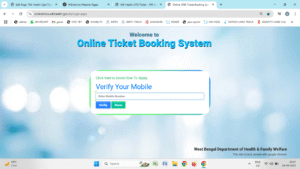
🔹 Step 1: Visit the Official WB Health Website
The first step is to visit the official website of the West Bengal Health Department.
👉 Go to https://wbhealth.gov.in
Once you’re on the homepage, scroll down to the E-Governance section. Click on the option labeled ‘Online Ticket Booking’.
🔹 Step 2: Enter Your Mobile Number
After clicking the ticket booking option, you’ll be directed to a login page. Here, you need to enter your valid mobile number. Make sure you use a number that is currently active, as you will receive an OTP on this number.
🔹 Step 3: Verify the OTP
Once you enter your mobile number, click “Submit.” You will receive a One-Time Password (OTP) via SMS.
Enter the OTP in the designated box and click on ‘Verify’ to proceed. This step is essential to authenticate the user and prevent spam entries.
🔹 Step 4: Select the Hospital
Now you will see a list of government hospitals that are part of the WB OPD Booking System.
Select the hospital you wish to visit, such as:
- SSKM Hospital, Kolkata
- NRS Medical College
- RG Kar Medical College
- Burdwan Medical College & Hospital
- Kolkata Medical College, and many others.
Choosing the right hospital will also display the departments and doctors available for that day.
🔹 Step 5: Choose Appointment Date
Next, select the date you want to visit. You will see a calendar view showing available slots.
Make sure to choose a day that suits you. It’s best to book appointments at least 2–3 days in advance, as slots for popular departments fill up quickly.
🔹 Step 6: Enter Patient Information
You now need to fill in the patient details correctly. The information required includes:
- Patient Name – Full legal name of the person visiting the hospital
- Age – Patient’s age
- Gender – Male/Female/Other
- Address – Full residential address including pin code
- Department – Choose the relevant department like General Medicine, ENT, Pediatrics, etc.
Fill in all fields carefully. Incorrect information may delay or cancel your appointment.
🔹 Step 7: Confirm and Download Your Ticket
Once all the fields are filled in, click on the ‘Save’ or ‘Confirm Booking’ button.
The system will now generate your OPD ticket in PDF format. This ticket contains all essential information such as:
- Hospital Name
- Date of Appointment
- Department
- Doctor Name (if available)
- Patient Details
- Room or OPD Number
🔹 Step 8: Print the OPD Ticket
Download the ticket PDF and take a printout. You’ll need to present this ticket at the hospital on the day of your appointment. This acts as your entry slip and helps hospital staff verify your booking.
Note: If you don’t have a printer at home, you can also save the PDF and print it at a local shop.
✅ Summary
Booking your Outdoor Ticket Online in West Bengal is now a simple and fast process. Just follow these 8 steps:
- Visit wbhealth.gov.in
- Enter your mobile number
- Verify the OTP
- Select your preferred hospital
- Choose your visit date
- Enter patient details
- Download the ticket PDF
- Print and carry it to your appointment
This online service saves time, reduces crowding, and ensures smoother operations in hospitals. Whether it’s a follow-up visit or a first-time consultation, booking your appointment online is the best way to ensure timely medical care in 2025.